

Fluent Community Database Schema
Fluent Community uses custom database tables to store all community data. Here are the list of database tables and their schema to understand overall database design and related data attributes of each model.
Core Entity Relationships
🔍 Interactive ER Diagram
Click on the diagram below to zoom in for better readability. The diagram shows the relationships between all Fluent Community database tables.
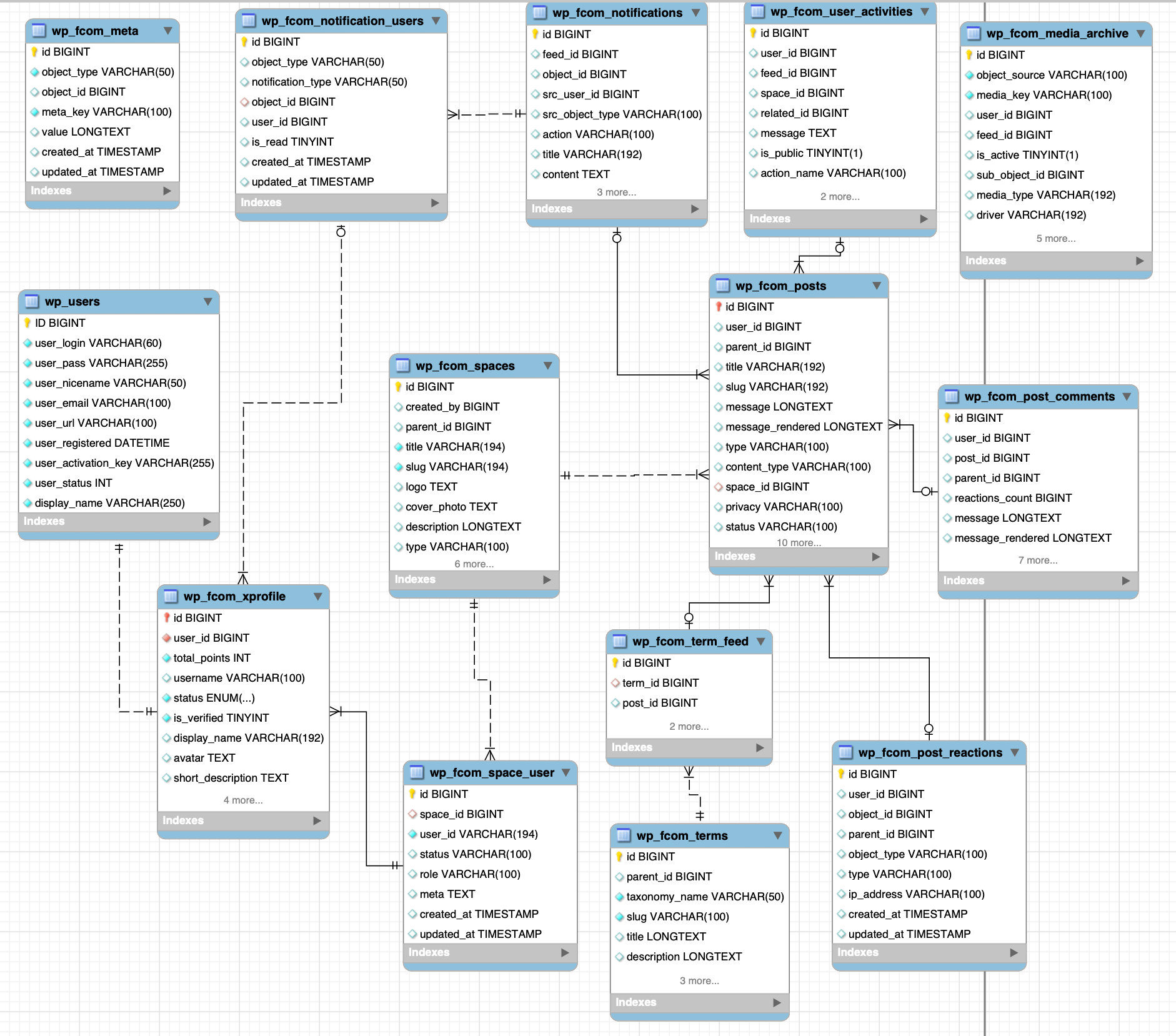
Schema Overview
The Fluent Community database schema is built around these core concepts:
Feeds & Content: Community posts with rich media support and nested discussions
Comments & Discussions: Threaded comment system with reactions and moderation
Spaces & Groups: Content organization with membership management and permissions
Users & Profiles: Extended user profiles with points, badges, and verification
Reactions & Engagement: Social interactions (likes, bookmarks, custom reactions) on posts and comments
Notifications: Real-time user notification system with multiple delivery channels
Media Management: File uploads with multiple storage drivers (local, S3, R2, BunnyCDN)
Activity Tracking: Comprehensive audit trail for all user actions and events
Topics & Tags: Content categorization and discovery system
Follow System (Pro): User-to-user following relationships and personalized feeds
Moderation (Pro): Content moderation and reporting system
Metadata System: Flexible key-value storage for all entities
Key Design Principles
Flexible Architecture: JSON columns used for extensible configuration data
Performance Optimization: Strategic indexing on frequently queried columns
Referential Integrity: Proper foreign key relationships maintained throughout
Audit Trail: Comprehensive activity logging for all important operations
WordPress Integration: Seamless integration with WordPress core tables (wp_users, wp_usermeta)
Database Tables
fcom_posts Table
This table stores posts and other content types in the community.
| Column | Type | Comment |
|---|---|---|
| id | BIGINT UNSIGNED Auto Increment | Primary key |
| user_id | BIGINT UNSIGNED NULL | ID of the user who created the post |
| parent_id | BIGINT UNSIGNED NULL | ID of the parent post (for nested content) |
| title | VARCHAR(192) NULL | Title of the post |
| slug | VARCHAR(192) NULL | URL-friendly version of the title |
| message | LONGTEXT NULL | The post content |
| message_rendered | LONGTEXT NULL | Rendered version of the post content |
| type | VARCHAR(100) DEFAULT 'feed' | Type of the post (feed, article) |
| content_type | VARCHAR(100) DEFAULT 'text' | Type of content (text, image, video) |
| space_id | BIGINT UNSIGNED NULL | ID of the space the post belongs to |
| privacy | VARCHAR(100) DEFAULT 'public' | Privacy setting (public, private, secret) |
| status | VARCHAR(100) DEFAULT 'published' | Status (published, draft, pending) |
| featured_image | TEXT NULL | URL or ID of the featured image |
| meta | LONGTEXT NULL | Additional metadata in JSON format |
| is_sticky | TINYINT(1) DEFAULT 0 | Whether the post is sticky |
| comments_count | INT(11) DEFAULT 0 | Number of comments on the post |
| reactions_count | INT(11) DEFAULT 0 | Number of reactions to the post |
| priority | INT(11) DEFAULT 0 | Priority for sorting |
| expired_at | DATETIME NULL | Timestamp when the post expires |
| scheduled_at | DATETIME NULL | Timestamp when the post is scheduled |
| created_at | TIMESTAMP NULL | |
| updated_at | TIMESTAMP NULL |
Indexes:
- user_id
- slug
- created_at
- idx_space_id_status
- idx_space_id_status_privacy
fcom_post_comments Table
This table stores comments and reactions for posts in the community.
| Column | Type | Comment |
|---|---|---|
| id | BIGINT UNSIGNED Auto Increment | Primary key |
| user_id | BIGINT UNSIGNED NULL | ID of the user who made the comment |
| post_id | BIGINT UNSIGNED NULL | ID of the post the comment belongs to |
| parent_id | BIGINT UNSIGNED NULL | ID of the parent comment (for nested comments) |
| reactions_count | BIGINT UNSIGNED DEFAULT 0 | Number of reactions to this comment |
| message | LONGTEXT NULL | The comment text |
| message_rendered | LONGTEXT NULL | Rendered version of the comment |
| meta | LONGTEXT NULL | Additional metadata in JSON format |
| type | VARCHAR(100) DEFAULT 'comment' | Type (comment, moderation) |
| content_type | VARCHAR(100) DEFAULT 'text' | Type of content (text, image) |
| status | VARCHAR(100) DEFAULT 'published' | Status (published, draft, pending) |
| is_sticky | TINYINT(1) DEFAULT 0 | Whether the comment is sticky |
| created_at | TIMESTAMP NULL | |
| updated_at | TIMESTAMP NULL |
Indexes:
- post_id
- status
- type
fcom_post_reactions Table
This table stores reactions to posts and comments in the community using a polymorphic relationship.
| Column | Type | Comment |
|---|---|---|
| id | BIGINT UNSIGNED Auto Increment | Primary key |
| user_id | BIGINT UNSIGNED NULL | ID of the user who reacted |
| object_id | BIGINT UNSIGNED NULL | ID of the object (post or comment) |
| parent_id | BIGINT UNSIGNED NULL | ID of the parent object |
| object_type | VARCHAR(100) DEFAULT 'feed' | Type of object (feed, comment) |
| type | VARCHAR(100) DEFAULT 'like' | Type of reaction (like, love, bookmark) |
| ip_address | VARCHAR(100) NULL | IP address of the user |
| created_at | TIMESTAMP NULL | |
| updated_at | TIMESTAMP NULL |
Indexes:
- object_user_object_type_type (object_id, user_id, object_type, type)
- object_type_parent_id_user_id (object_type, parent_id, user_id)
fcom_spaces Table
This table stores information about spaces (communities or groups) within the platform.
| Column | Type | Comment |
|---|---|---|
| id | BIGINT UNSIGNED Auto Increment | Primary key |
| created_by | BIGINT UNSIGNED NULL | ID of the user who created the space |
| parent_id | BIGINT UNSIGNED NULL | ID of the parent space (for nested spaces) |
| title | VARCHAR(194) NOT NULL | Title of the space |
| slug | VARCHAR(194) NOT NULL | URL-friendly version of the space title |
| logo | TEXT NULL | URL or path to the space logo |
| cover_photo | TEXT NULL | URL or path to the cover photo |
| description | LONGTEXT NULL | Full description of the space |
| type | VARCHAR(100) NULL | Type of space (space, space_group, sidebar_link) |
| privacy | VARCHAR(100) DEFAULT 'public' | Privacy setting (public, private, secret) |
| status | VARCHAR(100) DEFAULT 'published' | Status (published, draft, archived) |
| serial | INT(11) DEFAULT 1 | Display order/priority |
| settings | LONGTEXT NULL | JSON settings for the space |
| created_at | TIMESTAMP NULL | |
| updated_at | TIMESTAMP NULL |
Indexes:
- title
- status
fcom_space_user Table
This table manages the relationships between users and spaces, tracking membership and roles within each space.
| Column | Type | Comment |
|---|---|---|
| id | BIGINT UNSIGNED Auto Increment | Primary key |
| space_id | BIGINT UNSIGNED NULL | ID of the space |
| user_id | VARCHAR(194) NOT NULL | ID of the user |
| status | VARCHAR(100) DEFAULT 'active' | Status (active, pending, blocked, suspended) |
| role | VARCHAR(100) DEFAULT 'member' | User's role (member, admin, moderator) |
| meta | TEXT NULL | Additional metadata in JSON format |
| created_at | TIMESTAMP NULL | |
| updated_at | TIMESTAMP NULL |
Indexes:
- status
- space_id_user_id (space_id, user_id)
- role
fcom_media_archive Table
This table manages media files associated with various objects in the community platform.
| Column | Type | Comment |
|---|---|---|
| id | BIGINT UNSIGNED Auto Increment | Primary key |
| object_source | VARCHAR(100) NOT NULL | Source of the object (post, comment, profile) |
| media_key | VARCHAR(100) NOT NULL | Unique key for the media file |
| user_id | BIGINT NULL | ID of the user who uploaded the media |
| feed_id | BIGINT NULL | ID of the associated feed/post |
| is_active | TINYINT(1) DEFAULT 0 | Whether the media is active |
| sub_object_id | BIGINT NULL | ID of a sub-object (comment ID) |
| media_type | VARCHAR(192) NULL | Type of media (image, video, document) |
| driver | VARCHAR(192) DEFAULT 'local' | Storage driver (local, s3, r2, bunnycdn) |
| media_path | TEXT NULL | Path or identifier of the media file |
| media_url | TEXT NULL | URL to access the media file |
| settings | TEXT NULL | Additional settings in JSON format |
| created_at | TIMESTAMP NULL | |
| updated_at | TIMESTAMP NULL |
Indexes:
- is_active
- user_id
- media_key
- feed_id
fcom_meta Table
This table stores metadata for various objects in the community platform using a flexible key-value system.
| Column | Type | Comment |
|---|---|---|
| id | BIGINT UNSIGNED Auto Increment | Primary key |
| object_type | VARCHAR(50) NOT NULL | Type of object (space, user, post, feed) |
| object_id | BIGINT NULL | ID of the associated object |
| meta_key | VARCHAR(100) NOT NULL | Key for the metadata |
| value | LONGTEXT NULL | Value of the metadata |
| created_at | TIMESTAMP DEFAULT CURRENT_TIMESTAMP | |
| updated_at | TIMESTAMP NULL |
Indexes:
- object_type
- object_id
- meta_key
fcom_notifications Table
This table stores notification templates and definitions for the community platform.
| Column | Type | Comment |
|---|---|---|
| id | BIGINT UNSIGNED Auto Increment | Primary key |
| feed_id | BIGINT UNSIGNED NULL | ID of the associated feed/post |
| object_id | BIGINT UNSIGNED NULL | ID of the associated object |
| src_user_id | BIGINT UNSIGNED NULL | ID of the user who triggered the notification |
| src_object_type | VARCHAR(100) NULL | Type of source object |
| action | VARCHAR(100) NULL | Action that triggered the notification |
| title | VARCHAR(192) NULL | Title of the notification |
| content | TEXT NULL | Content of the notification |
| route | TEXT NULL | Route/URL for the notification |
| created_at | TIMESTAMP NULL | |
| updated_at | TIMESTAMP NULL |
Indexes:
- feed_id
- object_id
- action
fcom_user_activities Table
This table tracks user activities within the community platform for audit and activity feed purposes.
| Column | Type | Comment |
|---|---|---|
| id | BIGINT UNSIGNED Auto Increment | Primary key |
| user_id | BIGINT UNSIGNED NULL | ID of the user performing the activity |
| feed_id | BIGINT UNSIGNED NULL | ID of the associated feed/post |
| space_id | BIGINT UNSIGNED NULL | ID of the associated space |
| related_id | BIGINT UNSIGNED NULL | ID of related object (comment, reaction) |
| message | TEXT NULL | Activity message or description |
| is_public | TINYINT(1) DEFAULT 1 | Whether the activity is public |
| action_name | VARCHAR(100) DEFAULT '' | Name of the action (post_created, comment_added) |
| created_at | TIMESTAMP NULL | |
| updated_at | TIMESTAMP NULL |
Indexes:
- feed_id
- user_id
- action_name
fcom_xprofile Table
This table stores extended profile information for users in the community platform.
| Column | Type | Comment |
|---|---|---|
| id | BIGINT UNSIGNED Auto Increment | Primary key |
| user_id | BIGINT UNSIGNED NOT NULL UNIQUE | ID of the user associated with this profile |
| total_points | INT(11) UNSIGNED NOT NULL DEFAULT 0 | Total points earned by the user |
| username | VARCHAR(100) NULL | User's chosen username |
| status | ENUM NOT NULL DEFAULT 'active' | User status (active, blocked, pending) |
| is_verified | TINYINT(1) UNSIGNED NOT NULL DEFAULT 0 | Whether the user is verified |
| display_name | VARCHAR(192) NULL | User's display name |
| avatar | TEXT NULL | URL or path to user's avatar image |
| short_description | TEXT NULL | Brief description or bio of the user |
| last_activity | DATETIME NULL | Timestamp of user's last activity |
| meta | LONGTEXT NULL | Additional metadata in JSON format |
| created_at | TIMESTAMP NULL | |
| updated_at | TIMESTAMP NULL |
Indexes:
- user_id
- username
fcom_notification_users Table
This table stores individual user notifications and their read status.
| Column | Type | Comment |
|---|---|---|
| id | BIGINT UNSIGNED Auto Increment | Primary key |
| object_type | VARCHAR(50) DEFAULT 'notification' | Type of object (notification, subscription) |
| notification_type | VARCHAR(50) DEFAULT 'web' | Type of notification (web, email, push) |
| object_id | BIGINT UNSIGNED NULL | ID of the notification from fcom_notifications |
| user_id | BIGINT UNSIGNED NULL | ID of the user receiving the notification |
| is_read | TINYINT(1) UNSIGNED DEFAULT 0 | Whether the notification has been read |
| created_at | TIMESTAMP NULL | |
| updated_at | TIMESTAMP NULL |
Indexes:
- user_id_is_read_object_type (user_id, is_read, object_type)
- object_id_is_read_object_type_notification_type (object_id, is_read, object_type, notification_type)
fcom_terms Table
This table stores taxonomy terms (topics, tags, categories) for content organization.
| Column | Type | Comment |
|---|---|---|
| id | BIGINT UNSIGNED Auto Increment | Primary key |
| parent_id | BIGINT UNSIGNED NULL | ID of the parent term (for hierarchical taxonomies) |
| taxonomy_name | VARCHAR(50) NOT NULL | Name of the taxonomy (topic, tag, category) |
| slug | VARCHAR(100) NOT NULL | URL-friendly identifier |
| title | LONGTEXT NULL | Term title/name |
| description | LONGTEXT NULL | Term description |
| settings | LONGTEXT NULL | Additional settings in JSON format |
| created_at | TIMESTAMP NULL | |
| updated_at | TIMESTAMP NULL |
Indexes:
- taxonomy_name
- slug
fcom_term_feed Table
This table links posts to terms (topics, tags, categories).
| Column | Type | Comment |
|---|---|---|
| id | BIGINT UNSIGNED Auto Increment | Primary key |
| term_id | BIGINT UNSIGNED NULL | ID of the term |
| post_id | BIGINT UNSIGNED NULL | ID of the post |
| created_at | TIMESTAMP NULL | |
| updated_at | TIMESTAMP NULL |
Indexes:
- term_id
- post_id
Pro Plugin Tables
fcom_follows Table (Pro Plugin)
This table stores user following relationships (Pro feature).
| Column | Type | Comment |
|---|---|---|
| id | BIGINT UNSIGNED Auto Increment | Primary key |
| user_id | BIGINT UNSIGNED NOT NULL | ID of the user who is following |
| following_id | BIGINT UNSIGNED NOT NULL | ID of the user being followed |
| status | VARCHAR(50) DEFAULT 'active' | Status (active, inactive) |
| created_at | TIMESTAMP NULL | |
| updated_at | TIMESTAMP NULL |
Indexes:
- user_id
- following_id
- user_id_following_id (user_id, following_id)
fcom_moderation Table (Pro Plugin)
This table stores content moderation and reporting data (Pro feature).
| Column | Type | Comment |
|---|---|---|
| id | BIGINT UNSIGNED Auto Increment | Primary key |
| user_id | BIGINT UNSIGNED NULL | ID of the user who reported |
| post_id | BIGINT UNSIGNED NULL | ID of the reported post |
| parent_id | BIGINT UNSIGNED NULL | ID of the parent object |
| reactions_count | BIGINT UNSIGNED DEFAULT 0 | Number of reactions |
| message | LONGTEXT NULL | Moderation message |
| message_rendered | LONGTEXT NULL | Rendered version of the message |
| meta | LONGTEXT NULL | Additional metadata in JSON format |
| type | VARCHAR(100) DEFAULT 'comment' | Type (comment, report) |
| content_type | VARCHAR(100) DEFAULT 'text' | Type of content |
| status | VARCHAR(100) DEFAULT 'published' | Status (published, pending, rejected) |
| is_sticky | TINYINT(1) DEFAULT 0 | Whether the entry is sticky |
| created_at | TIMESTAMP NULL | |
| updated_at | TIMESTAMP NULL |
Indexes:
- post_id
- status
- type
WordPress Integration
Fluent Community seamlessly integrates with WordPress core tables for user management and authentication:
users Table
WordPress core user table - used for authentication and basic user information.
| Column | Type | Comment |
|---|---|---|
| ID | BIGINT UNSIGNED Auto Increment | Primary key |
| user_login | VARCHAR(60) NOT NULL | Username for authentication |
| user_pass | VARCHAR(255) NOT NULL | Hashed password |
| user_nicename | VARCHAR(50) NOT NULL | URL-friendly username |
| user_email | VARCHAR(100) NOT NULL | User email address |
| user_url | VARCHAR(100) NOT NULL | User website URL |
| user_registered | DATETIME NOT NULL | Registration timestamp |
| user_activation_key | VARCHAR(255) NOT NULL | Activation key |
| user_status | INT(11) NOT NULL DEFAULT 0 | User status |
| display_name | VARCHAR(250) NOT NULL | User's display name |
Integration: Fluent Community extends WordPress users with the fcom_xprofile table for community-specific data.
usermeta Table
WordPress core user metadata table - stores additional user information.
| Column | Type | Comment |
|---|---|---|
| umeta_id | BIGINT UNSIGNED Auto Increment | Primary key |
| user_id | BIGINT UNSIGNED NOT NULL DEFAULT 0 | Reference to users table |
| meta_key | VARCHAR(255) NULL | Meta key |
| meta_value | LONGTEXT NULL | Meta value |
Key Meta Keys Used:
first_name- User's first namelast_name- User's last namedescription- User biographywp_capabilities- User roles and capabilities
Integration: Fluent Community may store additional metadata here for WordPress compatibility.
Entity Relationships
One-to-Many Relationships
User → Posts: One user can create many posts
php$user->posts()->get();User → Comments: One user can create many comments
php$user->comments()->get();Space → Posts: One space can contain many posts
php$space->posts()->get();Post → Comments: One post can have many comments
php$post->comments()->get();User → Notifications: One user can receive many notifications
php$user->notifications()->get();
Many-to-Many Relationships
Users ↔ Spaces: Users can join multiple spaces, spaces can have multiple members
php$user->spaces()->get(); $space->members()->get();Posts ↔ Topics (Pro): Posts can have multiple topics, topics can be on multiple posts
php$post->topics()->get(); $topic->posts()->get();Users ↔ Users (Pro): Users can follow other users
php$user->following()->get(); $user->followers()->get();
Polymorphic Relationships
Reactions: Can be attached to posts or comments
php$post->reactions()->get(); $comment->reactions()->get();Meta: Can be attached to any entity type
phpMeta::where('object_type', 'post')->where('object_id', $postId)->get();Media: Can be attached to various content types
php$post->media()->get();
Common Data Types
Fluent Community uses consistent data types across all tables:
| Data Type | Usage | Example |
|---|---|---|
| BIGINT UNSIGNED | Primary keys, foreign keys, large integers | id, user_id, post_id |
| INT(11) | Counters, small integers | comments_count, priority |
| VARCHAR(192) | Short text fields, titles, names | title, slug, name |
| VARCHAR(100) | Type fields, status fields | type, status, privacy |
| TEXT | Medium text content | description, content |
| LONGTEXT | Large text content, JSON data | message, meta, settings |
| TIMESTAMP | Timestamps with automatic updates | created_at, updated_at |
| DATETIME | Specific date/time values | scheduled_at, expired_at |
| TINYINT(1) | Boolean flags | is_sticky, is_active |
| ENUM | Fixed value sets | status (active, blocked) |
Indexing Strategy
All Fluent Community tables include strategic indexes for optimal performance:
Primary Keys
- All tables have an auto-incrementing
idcolumn as the primary key - Ensures unique identification of each record
Foreign Key Indexes
user_id- Indexed on all tables with user relationshipspost_id- Indexed for comment and reaction lookupsspace_id- Indexed for space-related queriesobject_id- Indexed for polymorphic relationships
Composite Indexes
idx_space_id_status- Fast filtering of posts by space and statusidx_space_id_status_privacy- Fast filtering with privacy settings- Multiple column indexes for common query patterns
Unique Indexes
slug- Ensures unique URLs for posts, spaces, and topicsuser_id(in xprofile) - One profile per usercode(in coupons, if applicable) - Unique coupon codes
Performance Indexes
created_at- For chronological sortingstatus- For filtering by publication statustype- For filtering by content typeis_read- For filtering read/unread notifications
Working with the Database
Using Models (Recommended)
Fluent Community provides Eloquent-style models for all database tables:
use FluentCommunity\App\Models\Feed;
use FluentCommunity\App\Models\Comment;
use FluentCommunity\App\Models\Space;

// Fetch published posts
$posts = Feed::where('status', 'published')
    ->orderBy('created_at', 'desc')
    ->limit(10)
    ->get();

// Get post with comments
$post = Feed::with('comments')->find($postId);

// Create a new post
$post = Feed::create([
    'user_id' => get_current_user_id(),
    'space_id' => $spaceId,
    'title' => 'My Post Title',
    'message' => 'Post content here',
    'status' => 'published',
    'type' => 'feed'
]);
Direct Database Queries
For advanced use cases, you can use WordPress's $wpdb object:
global $wpdb;

// Get table name with prefix
$table = $wpdb->prefix . 'fcom_posts';

// Execute query
$posts = $wpdb->get_results(
    $wpdb->prepare(
        "SELECT * FROM $table WHERE status = %s AND space_id = %d",
        'published',
        $spaceId
    )
);
Important: Always use prepared statements to prevent SQL injection.
Database Migrations
Fluent Community handles database schema creation and updates automatically. The migration files are located in:
/databases/Migrators/Migration Files
PostsMigrator.php- Creates wp_fcom_posts tableCommentsMigrator.php- Creates wp_fcom_post_comments tableSpacesMigrator.php- Creates wp_fcom_spaces tableXProfileMigrator.php- Creates wp_fcom_xprofile table- And more...
Running Migrations
Migrations run automatically on plugin activation and updates. To manually trigger migrations:
do_action('fluent_community/run_migrations');Best Practices
1. Use Models Instead of Direct Queries
✅ Good:
$posts = Feed::where('status', 'published')->get();❌ Avoid:
global $wpdb;
$posts = $wpdb->get_results("SELECT * FROM {$wpdb->prefix}fcom_posts WHERE status = 'published'");
2. Use Relationships
✅ Good:
$post = Feed::with(['comments', 'author', 'space'])->find($id);❌ Avoid:
$post = Feed::find($id);
$comments = Comment::where('post_id', $id)->get();
$author = User::find($post->user_id);
3. Use Query Builder Methods
✅ Good:
Feed::where('space_id', $spaceId)
    ->where('status', 'published')
    ->orderBy('created_at', 'desc')
    ->paginate(20);
4. Leverage Indexes
✅ Good: Query on indexed columns
Feed::where('status', 'published')->where('space_id', $spaceId)->get();❌ Avoid: Querying on non-indexed columns for large datasets
Feed::where('message', 'LIKE', '%keyword%')->get(); // Slow on large tables5. Use Transactions for Multiple Operations
DB::beginTransaction();
try {
    $post = Feed::create($postData);
    $post->topics()->attach($topicIds);
    $post->meta()->create($metaData);

    DB::commit();
} catch (\Exception $e) {
    DB::rollback();
    // Handle error
}
Next Steps
- Database Models - Learn about model classes and relationships
- Query Builder - Master advanced database queries
- REST API - Access data via REST API endpoints
- Developer Hooks - Extend database operations with hooks
Additional Resources
Schema Visualization
For a visual representation of the database schema, you can use tools like:
- phpMyAdmin
- MySQL Workbench
- TablePlus
- Adminer
Database Documentation
The complete schema definitions are available in the plugin's migration files:
/wp-content/plugins/fluent-community/databases/Migrators/Support
For questions about the database schema: